We’ve all been there. You’re standing in a bookstore, holding a copy of a beautiful paperback, trying to remember: “Do I already own this?”
Or maybe you’re trying to recommend a specific novel to a friend, but you can’t find it on your shelves. You know you have it. You know the cover is blue. But after twenty minutes of searching, you realize you might have lent it to someone two years ago.
If you have more than a few dozen books, keeping track of them mentally becomes impossible. This is where cataloging your home library comes in. It sounds like a daunting task reserved for professional librarians, but with the right tools, you can turn a chaotic pile of books into a perfectly organized digital library in an afternoon.
Here is the step-by-step guide to cataloging your collection (and why you should stop using spreadsheets to do it).
Step 1: The “Great Gathering” (Physical Sorting)
Before you touch your phone, you need to deal with the physical books. If your books are scattered across different rooms, nightstands, and boxes in the attic, bring them to a central location, or tackle them room by room.
Don’t worry about alphabetizing them yet. Just ensure you can easily access the back cover of each book. Why? Because that’s where the ISBN barcode lives, and that barcode is your best friend for the next step.
Tip: This is also the perfect time to declutter. If you find a book you hated or will realistically never read, put it in a separate “donate” pile. Catalog only what you want to keep.
Step 2: Ditch the Spreadsheet (Choose Your Tool)
For years, the go-to method for tracking books was an Excel spreadsheet. While spreadsheets are great for accountants, they are terrible for book lovers.
- They are slow: You have to manually type titles and authors.
- No visuals: You can’t see the book covers.
- Hard to update on the go: Checking an Excel file on your phone while in a bookstore is a nightmare.
The Modern Solution: A Dedicated Book Tracker Using an app designed for this purpose speeds up the process by 10x. This is where Book Tracker shines. Unlike general reading timers, Book Tracker is built specifically to manage your library. It focuses on inventory, organization, and ease of entry.
Step 3: The Rapid Scan
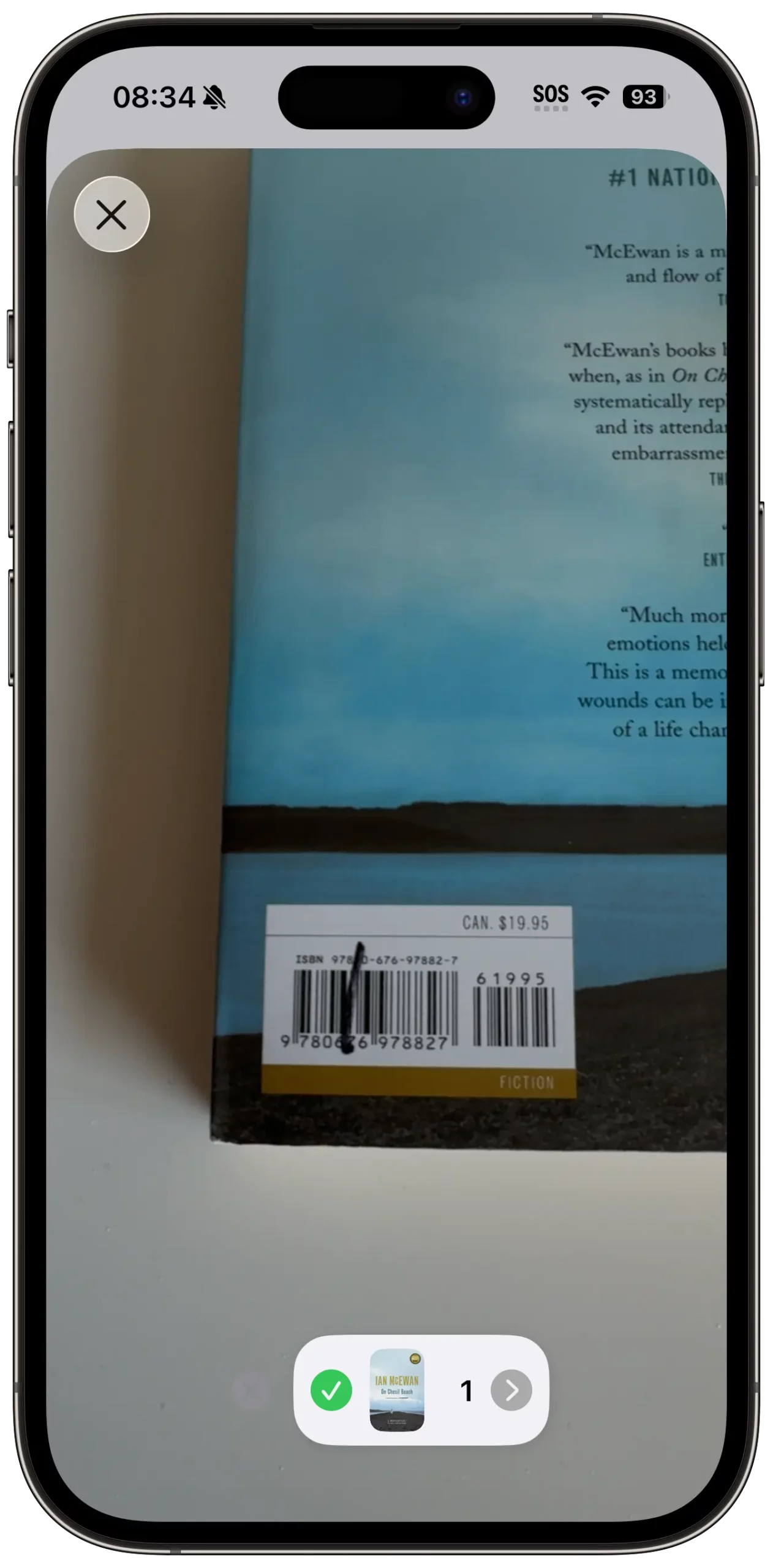
This is the fun part. Instead of typing out “The Great Gatsby” manually, you are going to use your phone’s camera.
- Open Book Tracker.
- Tap on the “+” button and select Scan Barcode.
- Point your camera at the barcode on the back of the book.
Beep.
In a split second, the app pulls in all the metadata: the correct title, author, page count, publisher, and the cover artwork.
You can get into a rhythm here. Pull a book, scan, set it down. Pull, scan, set down. You can easily catalogue 100 books in under 15 minutes using this method. It’s surprisingly satisfying!
What about vintage books? If you have older books without barcodes (usually pre-1970s), you can search for them manually within the app by title. Book Tracker connects to massive online databases to find the correct edition, so your digital library stays complete.
Step 4: Categorize and Tag
Now that your books are digital, you can do things you can’t do with physical shelves. You can organize them without moving them an inch.
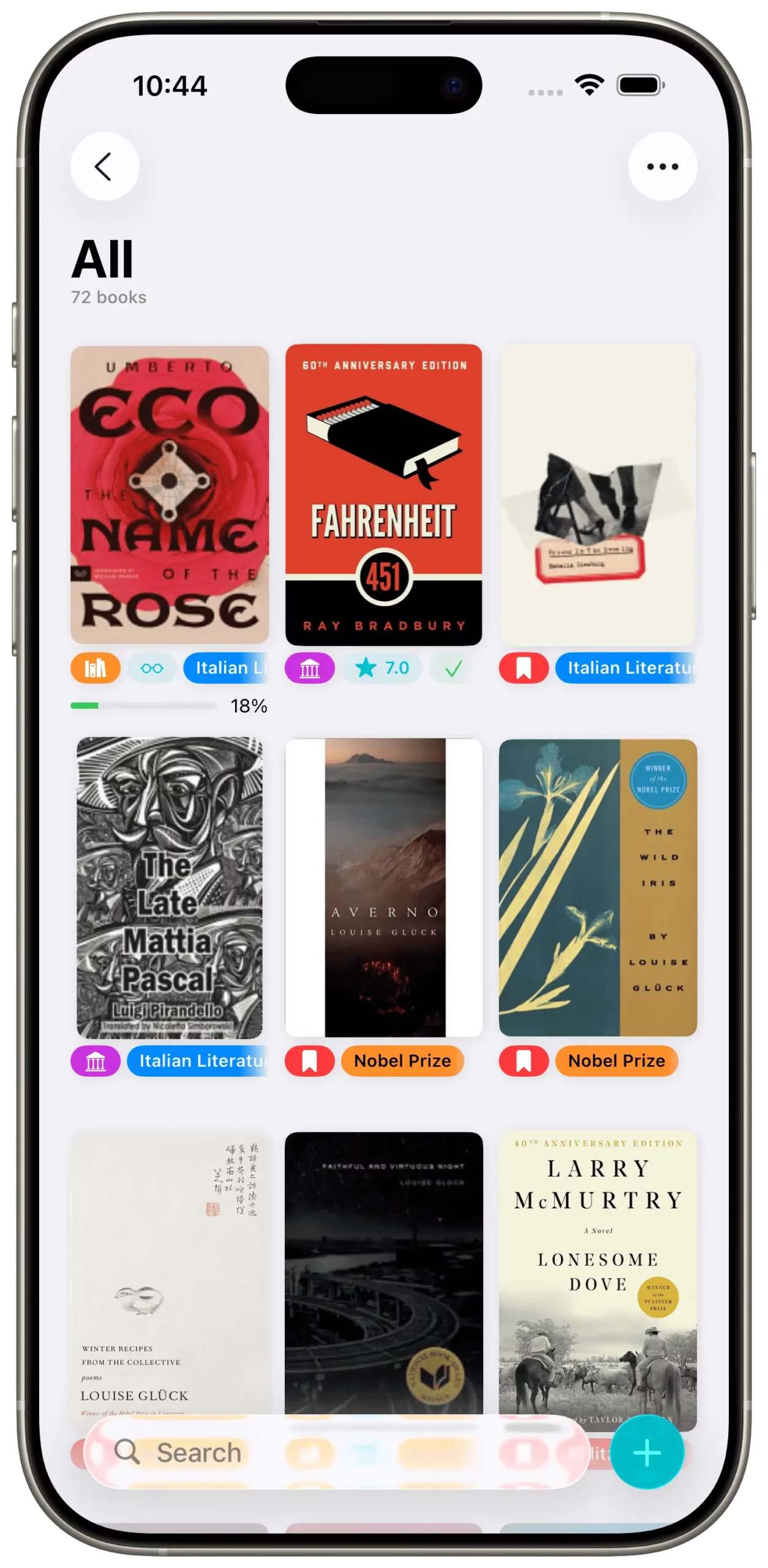
Most people sort their books into two main piles: Read and To Be Read (TBR). In Book Tracker, you can mark the status of the book instantly. This allows you to filter your library later. Imagine walking into a bookstore, opening your app, and filtering to see only your “Wishlist” or checking your “TBR” list to see if you really need to buy another book right now.
Pro Tip: Use Custom Tags Take your organization to the next level with tags. Here are a few ideas:
- “Signed”: Keep track of your autographed editions.
- Genre/Mood: Tag books by “Cozy Mystery,” “Sci-Fi,” or “Summer Reads.”
Step 5: Maintenance (The “One-in, One-Scan” Rule)
Congratulations! Your library is cataloged. You now have a searchable, beautiful database of every book you own right in your pocket.
To keep it this way, adopt a simple habit: The One-in, One-Scan Rule. Whenever you buy a new book or receive one as a gift, scan it into Book Tracker immediately before you even put it on the shelf. It takes five seconds and saves you from future chaos.
Why Bother?
Beyond the satisfaction of seeing your total book count (which is a bragging right in itself), cataloging your library saves you money. You stop buying accidental duplicates. You rediscover books you forgot you owned. And most importantly, you treat your personal library with the respect it deserves.
Ready to turn your chaos into a collection? Download Book Tracker on the App Store and start scanning today.
Level Up Your Reading Experience with Book Tracker!
Discover the joy of reading like never before. Organize your library, track your progress, and save your favorite quotes. Elevate your reading experience today!