For more than a decade, Goodreads has been the default place where readers track what they read. It has the largest book database, the longest review archive, and the most users. None of that has changed.
What has changed is everything around it. The interface still feels like 2010. Amazon has owned the platform since 2013 and the integration with Kindle is shallower than most readers expect. Privacy is essentially nonexistent: your reading history is visible, social, and tied to your account forever. There’s no Mac app, no Apple Watch app, the iPad version is a stretched iPhone view, and widgets, Live Activity, and Widget Controls don’t exist.
In 2026, the question isn’t “is Goodreads still good?”, it’s “which alternative is right for me?” The answer depends entirely on what you actually want from a book app: a private library catalog, a smarter recommendation engine, a healthier community, an open-source decentralized platform, or a daily habit coach.
This guide covers the 7 best Goodreads alternatives for iPhone in 2026, ranked by reader profile rather than abstract scores. By the end you’ll know exactly which one to switch to and how to bring your existing Goodreads library with you in under five minutes.
Quick answer (for readers in a hurry): in 2026 the best Goodreads alternative for most iPhone readers is Book Tracker: private, no account required, native on iPhone + iPad + Mac + Apple Watch, with deep cataloging, reading sessions, widgets, Live Activity, and one-tap Goodreads import. For community-focused readers the best alternative is Hardcover. For stats-driven readers the best alternative is The StoryGraph. For open-source decentralized purists the best alternative is BookWyrm. For daily habit coaching the best alternative is Bookly. For BookTok aesthetic the best alternative is Margins. For rich literary social discovery the best alternative is Literal.
What you’ll find in this guide
- Why people are leaving Goodreads in 2026
- The 7 alternatives, head-to-head comparison
- Detailed reviews, by reader profile
- Book Tracker — best for private library + Apple ecosystem
- The StoryGraph — best for stats lovers
- Hardcover — best for healthy community
- BookWyrm — best for open-source decentralized readers
- Literal — best for rich social discovery
- Bookly — best for habit coaching
- Margins — best for BookTok aesthetic
- How to leave Goodreads (without losing your data)
- FAQ
- Verdict — which one should you pick
1. Why people are leaving Goodreads in 2026
Goodreads is not “bad”. Most people leave it for one of seven specific reasons.
1. The interface hasn’t aged well. The web app and the iOS app both look and feel like apps from 2012. Adding a book is fiddly. Updating reading progress requires too many taps. The visual hierarchy is dated.
2. Amazon ownership shapes the priorities. Amazon bought Goodreads in 2013, and since then the product has stagnated. Many readers describe it as “abandonware kept alive”. The Kindle integration, somehow, is still shallow.
3. There’s no real privacy. Your shelves, your ratings, your reading dates, all of it is social by default. The granular privacy controls are limited and confusing. For many readers in 2026 this is the dealbreaker.
4. The data isn’t really yours. You can export a CSV (which is good), but the rich metadata, your review history, and your relationships with other users live on Goodreads servers. If the platform shuts down or pivots, you lose context.
5. Apple ecosystem features are nonexistent. No Mac app. No Apple Watch app. No widgets. No Live Activity. No Widget Controls. No App Intents. In 2026 this is a glaring gap for any iPhone user who has more than one Apple device.
6. The recommendations got worse, not better. As the user base grew, the recommendation engine got noisier. “If you liked X, you might like Y” became a reflection of crowd behavior more than personal taste.
7. The community has issues. Review-bombing, fake accounts, and the “BookTok culture wars” have changed how the social side feels. Many readers want to track their reading without participating in the drama.
If any two of these apply to you, you’ll be happier somewhere else. The remaining question is where.
For the long-form personal version of this argument see Why I Stopped Using Goodreads: The Case for a Private Digital Library, and for the one-on-one comparison with Book Tracker see Goodreads vs Book Tracker: Why You Should Switch for Better Privacy.
2. The 7 alternatives, head-to-head
| App | Best for | Privacy | Apple ecosystem (Mac/Watch/Widgets) | Account required | Goodreads import | Open source |
|---|---|---|---|---|---|---|
| Book Tracker | Private library + Apple users | Excellent (no account, iCloud only) | Excellent (iPhone + iPad + Mac + Watch + Widgets + Live Activity + Widget Controls) | No | Yes | No |
| The StoryGraph | Stats-driven readers | Good | Limited (iPhone only, no Watch, no Mac) | Yes | Yes | No |
| Hardcover | Healthy book community | Good (granular settings) | Limited (iPhone, web) | Yes | Yes | No |
| BookWyrm | Open-source decentralized | Excellent (you can self-host) | Web-first, no native iOS app yet | Yes (instance-based) | Yes | Yes (AGPL) |
| Literal | Rich social discovery | Standard | Limited | Yes (invite-only at times) | Yes | No |
| Bookly | Daily habit coaching | Standard | Medium (iPhone, basic iPad) | Yes | Yes (limited) | No |
| Margins | BookTok aesthetic + focus mode | Standard | Limited (iPhone only) | Yes | Yes | No |
3. Detailed reviews, by reader profile
Book Tracker — best for private library + Apple ecosystem
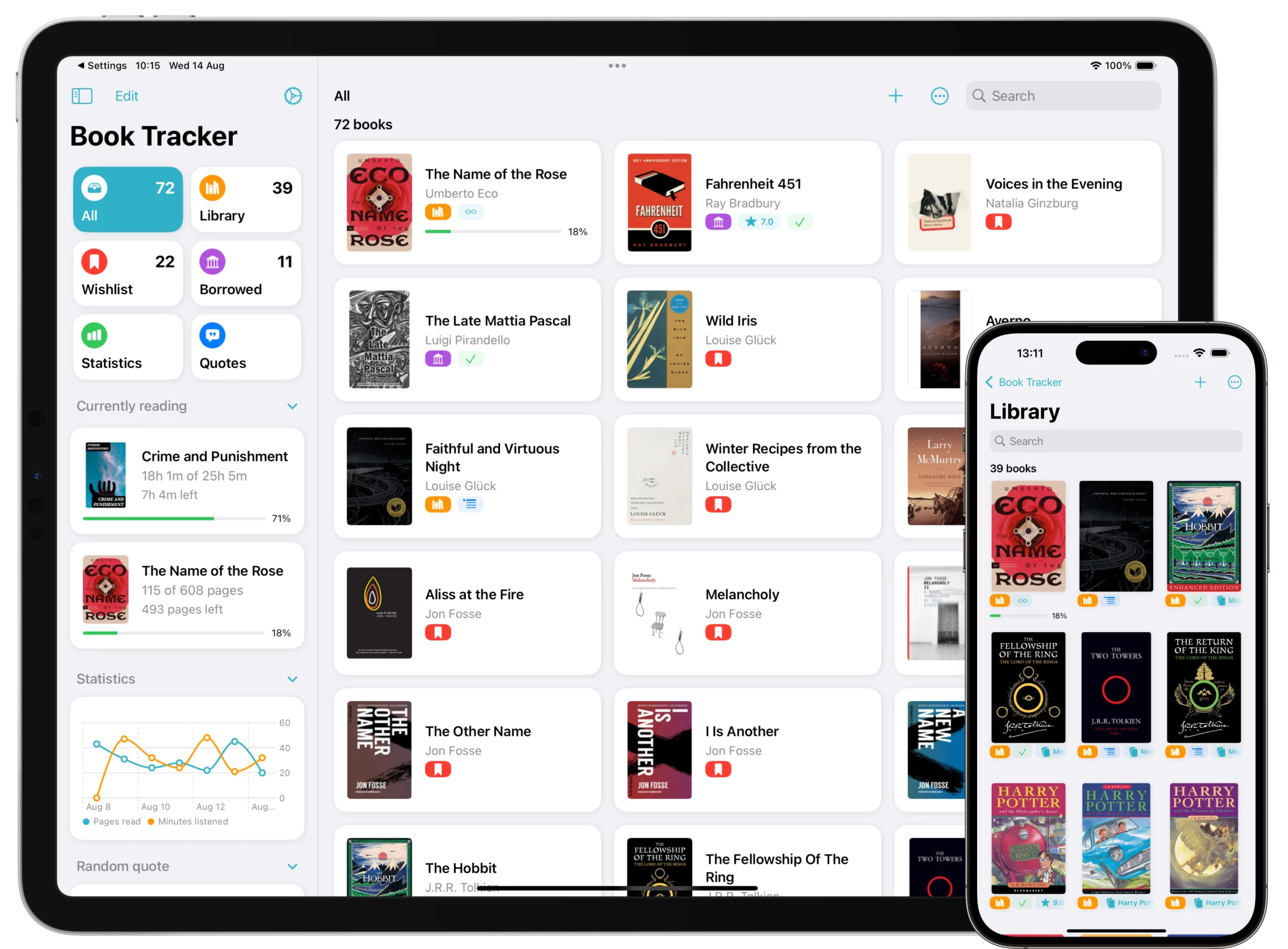
Profile: the reader who has more than 50 books, uses multiple Apple devices, cares about privacy, and wants a real library catalog rather than a social feed.
Book Tracker has been in continuous development since December 2019. It’s the only Goodreads alternative that runs natively on iPhone + iPad + Mac + Apple Watch with full feature parity, with no account required and end-to-end encrypted iCloud sync.
What it does that Goodreads doesn’t:
- Bulk barcode scanning with multi-source metadata enrichment.
- Format-aware tracking: paperback, hardcover, ebook, audiobook, manga. Multiple formats per single book entry.
- Hierarchical organization: Location → Bookcase → Shelf, plus Tags and Smart Lists.
- Lending tracker with named contacts and return reminders.
- Reading sessions with timer and Live Activity so you can monitor an active session from the Lock Screen.
- Annual Reading Challenge with Year in Review (a “Spotify Wrapped for books”. See More Than Music: How to Get Your Own Spotify Wrapped for Books).
- Quote OCR capture — point your camera at a page, get the text.
- 9 import sources (Goodreads included). See Migrating to Book Tracker.
- No account, no ads, no third-party SDKs, no behavioral tracking.
- Translated into 24 languages.
What it doesn’t do:
- No public reviews, no social feed, no following other readers. By design.
- No “vibes” or semantic discovery.
- Doesn’t run on Android.
Pricing: free with one-time IAP. No subscription.
How to start: download from the App Store, import your Goodreads library in 5 minutes following the migration guide.
Press recognition: featured on MacStories, 9to5Mac, AppAdvice, Mac Sources.
For the deep-dive on what makes a real cataloging tool versus a glorified reading list, see the pillar The Best App to Catalog Books in 2026: Why Metadata Matters.
The StoryGraph — best for stats lovers
Profile: the reader who loved Goodreads’ challenges and rating system but always wanted more data and smarter recommendations.
The StoryGraph is the most-recommended Goodreads alternative on Reddit and BookTok, and for good reason. It does one thing better than anyone else: it shows you patterns in your reading you didn’t know existed.
What it does well:
- Best-in-class statistics: pace breakdown, mood breakdown, page-count distribution, percentage of books read by genre, by format, by length.
- Smart recommendations based on your actual reading patterns, not crowd ratings.
- Reading challenges that go beyond “X books per year” (e.g. “read more diversely”, “try a slow-burn romance”).
- Half-star ratings and the ability to flag books as DNF without stigma.
- Buddy reads for reading groups.
- Content warnings and trigger filters.
- Goodreads import (CSV).
Limitations:
- iPhone-only mobile app (no iPad version optimized, no Mac, no Apple Watch).
- Account required and data lives on StoryGraph servers (not Apple-native sync).
- No widgets, no Live Activity, no Controls.
- No serious cataloging features (locations, multiple formats per book, lending tracker).
- Free tier is generous; paid tier (“Plus”) unlocks roadmap voting and more advanced filters.
Best for: the reader who finds joy in the data of reading, who wants to discover patterns and break out of genre echo chambers, and who’s OK with a phone-only experience.
Hardcover — best for healthy community
Profile: the reader who actually liked the social side of Goodreads (book discussions, reviews, follows) but is tired of the toxicity, the spam, and the Amazon ownership.
Hardcover launched in 2021 as an explicitly Amazon-free, community-first platform. Think of it as “what Goodreads should have become if it had stayed independent and well-designed.”
What it does well:
- Modern, fast UI that genuinely feels designed for 2026.
- Granular privacy settings (you choose what’s public, what’s followers-only, what’s private).
- Rich profiles, follows, lists, reviews — all the social features that made Goodreads useful, without the legacy.
- Half-star ratings, custom shelves, no upper limit on tracked books.
- Strong moderation to keep discussion civil.
- Goodreads import.
Limitations:
- iPhone app exists but is a thin shell of the web experience. No Mac, no Watch, no widgets.
- Smaller community than Goodreads (which is sometimes a feature, not a bug).
- Account required, server-hosted data.
Best for: the reader who wants the social experience done right, without leaving the privacy of their reading entirely behind.
BookWyrm — best for open-source decentralized readers
Profile: the reader who cares about software freedom, federation, and the right to leave a platform without losing context.
BookWyrm is an open-source (AGPL) decentralized book social platform built on the Fediverse using ActivityPub, the same protocol behind Mastodon. You can join an existing instance (like bookwyrm.social) or, if you’re technically inclined, self-host your own instance, federate with others, and own your reading data completely.
What it does well:
- True data ownership: if you self-host, your data lives on your server, period.
- Federation: follow readers across different BookWyrm instances seamlessly.
- Open-source forever: no acquisition risk, no enshittification curve.
- Goodreads import via CSV.
- Active development with a passionate FOSS community.
Limitations:
- No native iOS app (you use it via mobile web). This is the biggest blocker for most iPhone readers.
- Discoverability is more manual, federation introduces latency and fragmentation.
- The UX, while improving, is functional rather than delightful.
- Setup of a self-hosted instance requires technical skills (Docker, server admin).
Best for: technically inclined readers who care deeply about the principles of decentralized, open-source software, and who don’t mind a web-first experience.
Literal — best for rich social discovery
Profile: the reader who wants book-specific forums, deep discussion, and a community that feels more like Reddit-for-books than Instagram-for-books.
Literal is sometimes invite-only, sometimes open, and consistently described as “Goodreads meets Reddit with a cleaner interface”. It combines tracking with book-specific discussion threads where readers go deep on individual titles.
What it does well:
- Book-specific discussion threads that go beyond reviews.
- Curated lists from real readers.
- Following structure that surfaces interesting people, not just famous accounts.
- Modern interface that respects the reading experience.
- Goodreads import.
Limitations:
- iPhone app available; no Mac, no Watch, no widgets.
- Smaller community than Goodreads or Hardcover.
- Discovery flow can feel niche.
- Sometimes invite-only. Check current status before relying on it.
Best for: the reader who wants real discussion, not just star ratings.
Bookly — best for habit coaching
Profile: the reader who joins reading challenges with the same energy as fitness challenges: streaks, achievements, daily goals.
Bookly is positioned explicitly as a reading habit coach. Its signature feature is a reading session timer with detailed daily/weekly statistics and an aggressive achievement/streak system.
What it does well:
- Built-in reading timer with reading speed analysis.
- Streak page and achievements.
- Daily reading reminders with flexible scheduling.
- Reading reports with graphs per book/month/year.
- Goodreads-style “want to read / read / currently reading” lists.
Limitations:
- iPhone-first, basic iPad version, no Mac, no Watch.
- Account required.
- Cataloging features are minimal (no locations, no multi-format per book, no lending).
- Subscription model for full features.
Best for: the reader who needs external motivation to read more — a coach more than a librarian. For the deep comparison see Bookly vs Book Tracker: Do You Need a Coach or a Librarian?.
Margins — best for BookTok aesthetic
Profile: the iPhone-only reader who shares reading on TikTok and Instagram, and wants an app that’s beautiful, social, and gamified.
Margins launched in late 2024 with a strong design-forward, BookTok-friendly identity. It pairs reading tracking with discovery features (“vibes search”, image-based search) and a focus mode that blocks distracting apps during reading sessions.
What it does well:
- “Vibes” semantic search — describe a book you want in natural language.
- Image-based search — upload a cover photo.
- Reading focus mode with app blocking.
- Streak page and habit-building.
- Beautiful share cards for social media.
- Goodreads + Fable import.
Limitations:
- iPhone only. No iPad, no Mac, no Watch.
- Account required.
- Cataloging features are light.
- Subscription tier for premium features.
Best for: the reader for whom reading is a social-aesthetic activity. For the full head-to-head see Margins vs Book Tracker: Which Reading App Fits Your Library?.
4. How to leave Goodreads (without losing your data)
Whichever alternative you pick, the migration process is the same five steps. It takes about 5-10 minutes.
Step 1 — Export your Goodreads library
- Log into Goodreads.com on a desktop browser (mobile doesn’t expose the export option).
- Go to My Books → Tools → Import and Export (direct URL: goodreads.com/review/import).
- Click Export Library. Goodreads generates a CSV with all your books, ratings, reading dates, shelves.
- Wait 30 seconds to a few minutes (depending on library size). Click the download link.
Step 2 — Save the CSV to a place you can reach from your iPhone
Easiest option: drop the file into iCloud Drive (any folder). It will appear in the Files app on your iPhone.
Alternative: email it to yourself, then save the attachment to Files.
Step 3 — Pick your new app and download it
Use the comparison above to pick. For most iPhone readers, Book Tracker is the right choice. Download it from the App Store.
Step 4 — Import the CSV
In Book Tracker:
- Open the app.
- Tap Settings → Import.
- Select Goodreads as the source.
- Choose the CSV file from Files.
- Wait for the import to complete (usually 1-3 minutes for a typical library).
For the detailed walkthrough see Migrating from Goodreads, and for the complete step-by-step including how to fix the most common issues, see the companion guide How to Import Your Goodreads Library to Book Tracker (Step-by-Step 2026).
Step 5 — Verify and clean up
After import, browse your new library to verify everything is there. Two common issues:
- Some books show 0 pages — Goodreads doesn’t always include page count in the export. Fix: see Why are some books showing 0 pages?.
- Some covers are missing — Goodreads CSV doesn’t include cover images. Fix: see Why are covers missing after import?.
Both fixes take about a minute each. Once done, your migration is complete and your reading history is preserved.
Bonus: should you delete your Goodreads account?
Not immediately. Keep your Goodreads account active for at least 60 days as a backup, in case you discover something that didn’t import. After two months of confidence in your new app, you can delete the account from Goodreads → Account Settings → Close Account.
5. Frequently Asked Questions
Q: What is the best alternative to Goodreads in 2026?
For most iPhone readers, the best alternative is Book Tracker: it’s private, requires no account, runs natively on iPhone + iPad + Mac + Apple Watch, and imports Goodreads in 5 minutes. For stats lovers the best is The StoryGraph. For community-focused readers it’s Hardcover. For open-source decentralized purists it’s BookWyrm.
Q: Will I lose my reading history if I leave Goodreads?
No. Goodreads lets you export everything to a CSV file (titles, ratings, reading dates, shelves), and all major alternatives can import it. Your reading history is preserved.
Q: Are these alternatives free?
Most have a free tier. Book Tracker is free with one-time IAP. The StoryGraph, Hardcover, BookWyrm, and Literal have generous free tiers with optional paid upgrades. Bookly and Margins use subscription models for premium features.
Q: Which alternative has the best privacy?
Book Tracker (no account, data only on your devices and in your private iCloud, end-to-end encrypted by Apple) and BookWyrm (you can self-host) are the strongest privacy options. The StoryGraph and Hardcover have good privacy controls but data still lives on their servers. See How does Book Tracker handle my privacy? for the full Book Tracker posture.
Q: I want a Mac app and an Apple Watch app. Which alternative offers them?
Only Book Tracker offers full native apps for iPhone, iPad, Mac, and Apple Watch with feature parity. None of the other Goodreads alternatives offers this combination.
Q: What about Storytel, Audible, Libby, or Kobo?
Those are reading/listening platforms, not tracking apps. They handle the consumption of books. The apps in this guide handle the cataloging and tracking of what you read across all your reading platforms.
Q: Can I use multiple of these apps together?
Yes, and it’s actually a common setup. For example: Book Tracker as your private library catalog of record, plus Hardcover for the social side. Or Book Tracker for cataloging, plus StoryGraph for the stats deep-dive. The apps don’t directly conflict.
Q: How long does it take to import a Goodreads library?
For a typical library (under 500 books) it takes 5-10 minutes total: 30 seconds to export from Goodreads, 1-2 minutes to wait for the email/download, 2-3 minutes for the import to complete in the new app, and a few minutes to verify and fix the small import issues (missing covers, page counts).
6. Verdict — which one should you pick
There’s no universal “best” alternative. The right one depends on what you actually want from a book app. Here’s the decision tree compressed to one line each:
- You want a private library catalog + Apple ecosystem → Book Tracker.
- You love the data side of reading → The StoryGraph.
- You want community without the toxicity → Hardcover.
- You want open-source decentralized + data sovereignty → BookWyrm.
- You want deep book discussions → Literal.
- You want a daily reading habit coach → Bookly.
- You want BookTok-friendly aesthetic + focus mode → Margins.
If you can’t decide, default to Book Tracker. It works for the widest range of readers (private library + tracking + Apple ecosystem), it’s free, it imports your Goodreads in five minutes, and you can run it alongside any of the others.
Download Book Tracker on the App Store (iPhone + iPad + Apple Watch) or on the Mac App Store (Mac).
Continue reading:
- How to Import Your Goodreads Library to Book Tracker (Step-by-Step 2026) — the practical migration guide.
- Why I Stopped Using Goodreads: The Case for a Private Digital Library — the personal essay version of this argument.
- Goodreads vs Book Tracker: Why You Should Switch for Better Privacy — the head-to-head Book Tracker comparison.
- The Best App to Catalog Books in 2026: Why Metadata Matters — the cataloging deep-dive pillar.
- Bookly vs Book Tracker: Do You Need a Coach or a Librarian? — the Bookly head-to-head.
- Margins vs Book Tracker: Which Reading App Fits Your Library? — the Margins head-to-head.
- Migrating to Book Tracker — bring your existing data over from any source.
- The Complete Guide to Tracking Your Reading on Apple Devices in 2026
- Book Tracker Tutorial and FAQ.
Level Up Your Reading Experience with Book Tracker!
Discover the joy of reading like never before. Organize your library, track your progress, and save your favorite quotes. Elevate your reading experience today!