If you own more than fifty books, you don’t just have a collection, you have a library. And a library needs a catalog.
In 2026 there are dozens of apps that claim to “track your books.” Most of them are reading lists with a barcode scanner bolted on. They tell you how many books you read, but they can’t tell you whether the hardcover of East of Eden you bought in 2019 is the one currently sitting on your friend Sarah’s coffee table or the one you re-shelved in your office last week. They can’t tell you how much you’ve invested in your collection over a decade. They can’t help you avoid buying The Three-Body Problem for the third time.
Cataloging is a different discipline. It’s not about “did I read this?”, it’s about “what do I own, where is it, what is its state, and what is its meaning to me?”. The bridge between the two disciplines is metadata: the rich, structured data that turns a stack of titles into a real, queryable, useful library.
This guide explains what to look for in a serious book cataloging app in 2026, the eight pillars that separate a real library tool from a glorified reading list, the right tool for each kind of collector, and the most common mistakes that turn a beautiful library into a chaotic spreadsheet. The complete cataloging engine described here is built into Book Tracker for iPhone, iPad, Mac, and Apple Watch.
Quick answer (for readers in a hurry): in 2026 the best app to catalog books on iPhone, iPad, and Mac is Book Tracker. It combines bulk barcode scanning, multi-source metadata enrichment from 6 different APIs, full format-aware tracking (paperback, hardcover, ebook, audiobook, manga), a hierarchical organization system (location → bookcase → shelf → tags), a built-in lending tracker, native iCloud sync without an account, and the deepest Apple ecosystem integration on the market, including dedicated apps for Mac and Apple Watch, 7+ Home Screen widgets, Live Activity for reading sessions, and 18+Controls. It’s free to download with no ads and no tracking.
What you’ll find in this guide
- The difference between “tracking books” and “cataloging books”
- The 8 pillars of a real cataloging app in 2026
- The 5 reader personas and the catalog they need
- How to migrate your existing collection to a real catalog
- 6 cataloging mistakes to avoid in 2026
- FAQ
- Verdict: which app is the right one for you
1. “Tracking books” and “cataloging books” are not the same thing
Most readers conflate these two activities, and most apps exploit the confusion.
Tracking is about your reading life: did I finish this, when, how fast, how did I rate it, what’s next on my to-read pile. It’s a time-series story about you-the-reader.
Cataloging is about your library: what physical and digital objects do I possess, in what edition, where are they, who borrowed them, when did I buy them, how much are they worth, and which ones do I want next. It’s a static-but-living map of an asset.
A reading-tracker app needs to know titles, ratings, dates, and pages. A cataloging app needs to know editions, ISBNs, formats, locations, purchase data, lending status, conditions, prices, and series order. The two overlap, but the requirements diverge sharply once a library passes about 50 books. The moment you realize that “did I already buy this?” is a question only a real catalog can answer.
The best apps in 2026 do both. The market is full of apps that pretend to do both and actually only do one. This guide focuses on the cataloging half, because it’s the half that gets neglected, and because it’s the one that grows in importance as your collection grows.
For a parallel guide focused on the tracking side, see Finding the Best Reading Tracker App for Your Goals in 2026.
2. The 8 pillars of a real cataloging app in 2026
Every serious cataloging app, for any media (books, films, vinyl, comics) answers the same eight questions. If your current app fails on more than two, you’ve outgrown it.
Pillar 1 — Bulk barcode scanning
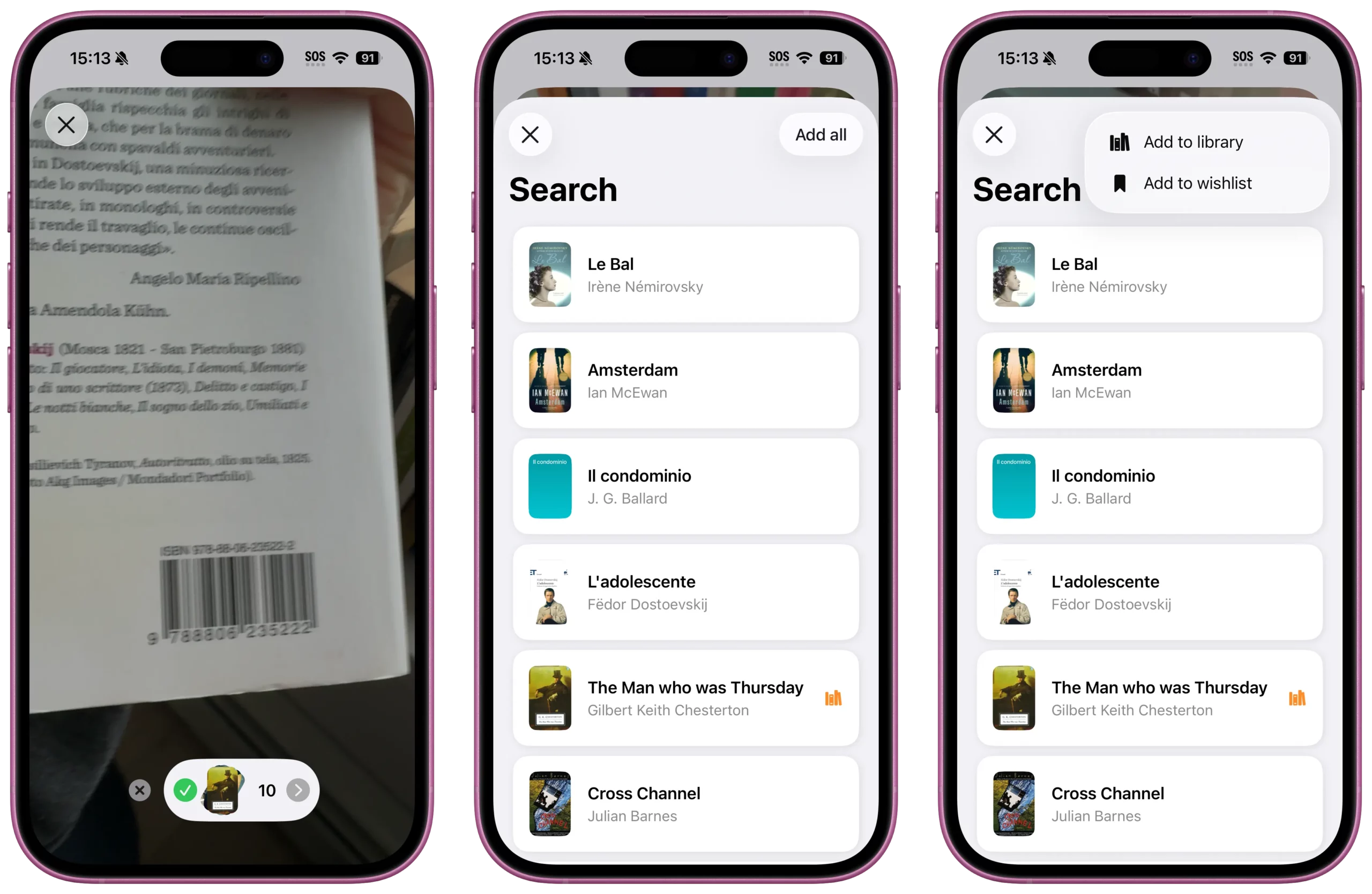
A library of 500 books takes a very long time to type out manually. The first job of a cataloging app is to make data entry friction-free.
What to look for:
- Single-tap barcode scan that recognizes the ISBN and auto-fills title, author, publisher, year, page count, cover.
- Bulk scan mode: keep the camera on and scan one book after the other without dismissing dialogs. This is the difference between cataloging 200 books in an afternoon and giving up after 30.
- OCR cover scan as a fallback when the barcode is missing, damaged, or for pre-ISBN books (anything before 1970).
- Manual entry with the same metadata fields, for special editions or signed copies.
Book Tracker covers all four. The bulk scan mode in particular is built for the “I just got back from a used-book sale and brought home a stack” use case. See the tutorial: How to add a new book in Book Tracker.
Pillar 2 — Multi-source metadata enrichment
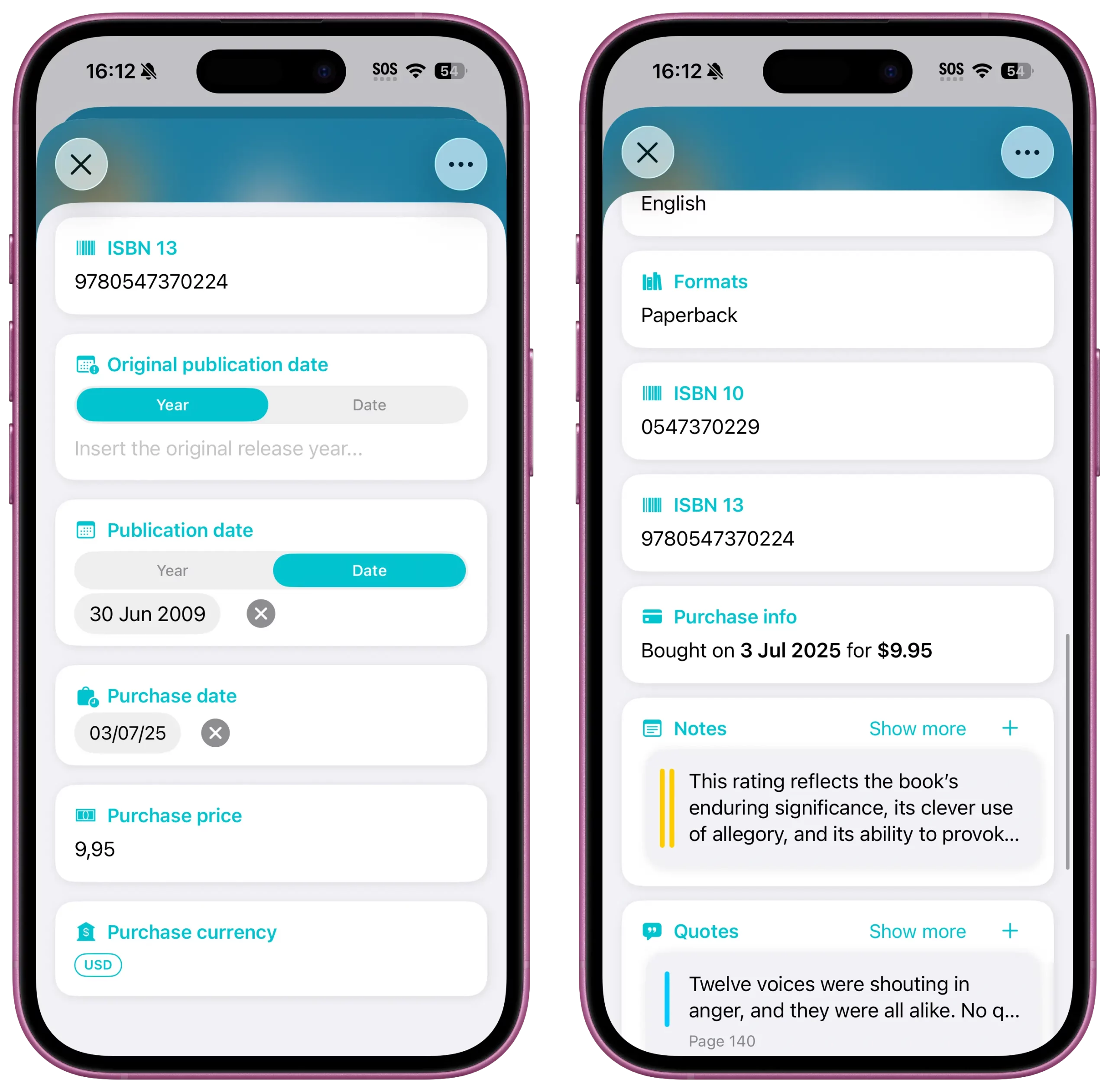
Not every book exists in every database. The most common reason apps fail to find your book is that they only query one source (usually Google Books) and your specific edition isn’t there.
A serious cataloging app queries multiple sources in parallel and merges the results, picking the richest record. Book Tracker queries six. This is why Book Tracker is one of the few apps that consistently finds Japanese manga, Italian academic editions, and out-of-print hardcovers, books that single-source apps quietly fail to identify.
Pillar 3 — Format-aware tracking
A modern reader owns the same book in multiple formats. You bought Project Hail Mary as a hardcover for the shelf, listened to the Ray Porter audiobook in the car, and re-read it on Kindle while traveling. That’s three formats of the same book, not three duplicate entries.
What to look for:
- Native support for paperback, hardcover, ebook, audiobook, plus specialized types like manga and comics.
- Per-format reading progress: 60% of the audiobook, 100% of the paperback.
- Per-format ownership status: own the paperback, borrowed the ebook from the library.
- Per-format purchase data: when and for how much.
Book Tracker handles all this with one entry per book and multiple format records inside it. A cataloging app that forces you to create three duplicate entries to track three formats is doing it wrong.
Pillar 4 — Hierarchical organization that mirrors reality
The “shelf” metaphor in most apps is a fiction: a single flat label slapped on a book. In a real home, books live in a hierarchy: room → bookcase → shelf. And then they belong to cross-cutting categories: fantasy, 2026 challenge, gifts to give, signed by author.
A serious cataloging app supports both axes:
- Hierarchical positions: Location (“Living Room”) → Bookcase (“West wall”) → Shelf (“Top, left”). When you move a bookcase, you don’t reassign 80 books one by one.
- Tags for the cross-cutting categories: free-form, multi-assignment, no hierarchy.
- Smart Lists: dynamic queries like “Owned hardcovers I haven’t read yet, in the Sci-Fi tag” that update automatically as you add or change books.
- Series management with custom numbering, so you always know which book is next in a 14-book saga.
Book Tracker supports all of these. See the tutorials: How to organize books with Positions, How to use Tags and Smart Lists, How to manage Series and sort books.
Pillar 5 — Lending tracker
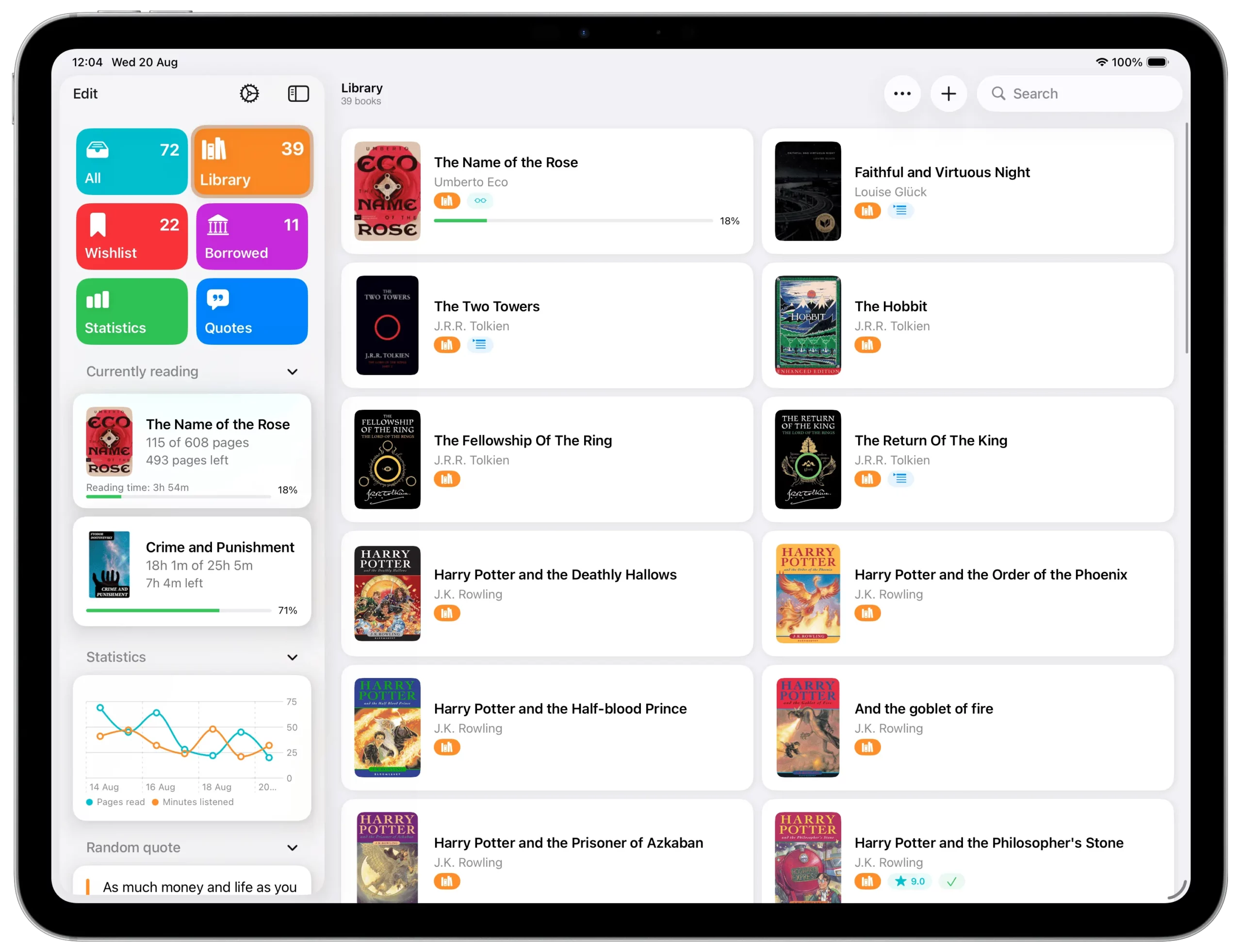
Statistically the second most painful gap in book apps (after “the app didn’t find my book”) is the books you’ll never see again because you forgot you lent them.
A serious cataloging app needs:
- A “Loaned Out” status at the book level.
- A borrower record linked to your contacts.
- A return date field.
- A dedicated Loaned Out view where all currently-out books appear at a glance.
Book Tracker has all of this. Combined with iCloud sync, you can quickly check from any device “what books did I lend to Marco?” before sending him the slightly-passive-aggressive reminder. See the tutorial: How to track Borrowed and Loaned Out books.
Pillar 6 — Wishlist + duplicate prevention
The opposite gap: books you’d love to buy and books you’ve already bought twice without realizing.
A serious cataloging app needs:
- A wishlist that lives separately from your owned library, but is searchable together with it.
- Duplicate detection: when you scan a book, the app warns you if you already own it (or a different format of it).
- The ability to convert wishlist → owned in one tap once you actually purchase.
Without these three features, every used-book sale becomes a roulette of duplicates.
Pillar 7 — Privacy and ownership of your data
In 2026 reading data is a commodity. Many popular book apps are funded by selling behavioral profiles or by monetizing your reading list. This is uncomfortable enough on its own, but for cataloging it has a deeper consequence: the database that defines your library should not live on someone else’s server.
A real cataloging app:
- Requires no account to function.
- Stores data locally on your device and in your private iCloud, not on the developer’s servers.
- Has no third-party SDKs, no behavioral tracking, no ads.
- Lets you export your full library at any time in a standard format (CSV).
- Documents its privacy posture publicly.
Book Tracker’s posture is documented in Why Book Tracker is a privacy-first app and in our Manifesto. The technical FAQ is at How does Book Tracker handle my privacy?.
For the long-form argument on why this matters in book apps specifically, see Why I Stopped Using Goodreads: The Case for a Private Digital Library.
Pillar 8 — Native Apple integration (the 2026 differentiator)
Five years ago “iOS app” meant essentially the same thing for everyone. In 2026 the gap between an app that runs on iOS and an app that lives in the Apple ecosystem is enormous, and for a cataloging tool, which you’ll consult dozens of times a week from different devices and contexts, it’s the most underrated feature class.
What a 2026 native catalog should offer:
- Mac app that’s truly native, with sidebar navigation, multi-window support, drag-and-drop, full keyboard support.
- iPad app with a real sidebar layout, not a stretched iPhone view.
- Apple Watch app to log reading sessions, see what you’re currently reading, glance at stats.
- iCloud sync without an account, end-to-end encrypted by Apple.
- Home Screen and Lock Screen widgets for currently reading, quotes, statistics, reading challenge progress.
- Widget Controls for one-tap actions from Control Center or Lock Screen (start a reading session, scan a barcode, jump to your wishlist).
- Live Activities for an active reading session you can monitor without unlocking your phone.
- Siri Shortcuts and App Intents to script your reading routines.
- Spotlight integration so your library is searchable system-wide.
Book Tracker is the only book cataloging app that runs natively on iPhone + iPad + Mac + Apple Watch with full feature parity. The relevant tutorials: How to customize your app with Widgets, How to use Live Activity with the Reading Timer, How to use Book Tracker with Shortcuts and Siri, and the broader How Book Tracker integrates with iOS and macOS features.
3. The 5 reader personas and the catalog they need
A cataloging app is not one-size-fits-all. Here are the five most common collector profiles and the features each one should prioritize.
Persona 1 — The serious collector (200+ books, mixed formats)
You have shelves in multiple rooms. You collect specific authors, signed copies, first editions. You’ve already bought duplicates by accident and you regret it.
Must-haves: bulk barcode scanning, multi-source metadata, hierarchical positions (location/bookcase/shelf), duplicate detection on wishlist, edition tracking, purchase price, condition notes, lending tracker, full export.
Why Book Tracker: all of the above, plus the purchase date and price tutorial for documenting the financial side. For the “is my collection worth something?” question, see Is Your Library Worth a Fortune?.
Persona 2 — The audiobook + paper hybrid
You read the hardcover at home, listen to the audiobook in the car, and own a Kindle copy for travel. You hate apps that force you to track all three as separate books.
Must-haves: format-aware tracking (per-book, not per-entry), per-format reading progress, audiobook duration tracking, “currently reading” status that spans formats.
Why Book Tracker: native handling of multiple formats inside a single book entry. For Kindle specifically, see the FAQ Can I add Kindle books to Book Tracker? and Can I import my Kindle library into Book Tracker?.
Persona 3 — The manga and comics collector
Your collection isn’t books, it’s series. You own 47 volumes of One Piece in Italian, 12 volumes of Berserk in English, and you need to know exactly which volume is missing before you walk into the comics shop.
Must-haves: flawless series management with custom volume numbering, per-volume ownership tracking, gap detection, multi-language metadata, manga-aware ISBN scanning (many catalog apps fail on Japanese ISBNs).
Why Book Tracker: the multi-source metadata system handles Japanese, Korean, and Italian editions correctly, and the series management is one of the deepest in the category. Many users praise this specifically. One App Store review reads “I tried several book catalog apps and Book Track was the only one that could find my Japanese manga when I scanned the barcode.”
Persona 4 — The classroom teacher / school librarian
You manage a class library or a small school collection. Students borrow books, books come back (or don’t), and you need a simple way to track who has what.
Must-haves: lending tracker with named contacts, return reminders, easy wishlist for new acquisitions, simple sharing of book lists with colleagues, no account required (so students don’t sign up).
Why Book Tracker: the lending tracker is built exactly for this scale. One real App Store review from a teacher: “This is exactly what I was looking for to make school reading book lists for the teachers to tick off as the pupils read them. It’s saved me weeks!”. For coordinating multiple devices, see the tutorial How to sync Book Tracker across iPhone, iPad, and Mac.
Persona 5 — The minimalist (one-shelf reader)
You own 30-50 books, but each one matters. You want a beautiful catalog you’ll consult once a month, not a cockpit dashboard.
Must-haves: clean UI, fast barcode scanning, simple categorization (a few tags is enough), reading progress tracking, no overwhelm.
Why Book Tracker: scales down gracefully. You can ignore Smart Lists, locations, and bulk-edit tools entirely and use only the basics. The configurations let you tune the UI to your level of complexity. See How to customize Book Tracker with Configurations.
4. How to migrate your existing collection to a real catalog
If you’re reading this, you probably already have your books listed somewhere: Goodreads, Bookpedia, Delicious Library, BookBuddy, a spreadsheet, an old app you don’t remember the name of. The good news: a serious cataloging app accepts imports from all of these. The better news: Book Tracker accepts the most.
The 9 supported import sources today:
- Goodreads — see Migrating from Goodreads
- Bookpedia — see Migrating from Bookpedia (and the dedicated post The Best Alternative to Bookpedia)
- Delicious Library 3 — see Migrating from Delicious Library 3 (and the dedicated post Delicious Library 3 Is Dead — The Best Modern Alternative for Mac Users in 2026)
- StoryGraph
- BookBuddy
- BookCrawler
- Bookmory
- Reading List
- Custom CSV — for everything else, see Migrating from other apps via CSV Import
The full overview is at Migrating to Book Tracker. For the technical side, see the FAQ Which apps can I import my library from? and the tutorial How to import your library into Book Tracker.
If your import shows zero pages on some books, it’s a known quirk fixed in two clicks. See Why are some books showing 0 pages?. Same for missing covers: Why are covers missing after import?.
For the strategic side of cataloging your existing physical library from scratch, see the companion post How to Catalog Your Home Library: A Step-by-Step Guide for Book Lovers.
5. Six cataloging mistakes to avoid in 2026
The same five or six errors derail most home libraries. They’re easy to avoid if you know they exist.
Mistake 1 — Choosing an app that depends on a single metadata source
When your app can only query Google Books, you’ll silently miss 5-15% of your library: foreign editions, manga, academic books, anything pre-1990. Demand multi-source metadata.
Mistake 2 — Cataloging without a position system
A flat list of 600 titles is unsearchable in the real world. The first time you can’t find Crime and Punishment in your house, you’ll wish you’d assigned it to “Living Room → Tall bookcase → Third shelf from top”. Set up your locations on day one, even if they feel pedantic.
Mistake 3 — Treating your wishlist like your library
A wishlist mixed with owned books generates duplicate purchases. Always keep them in separate states. Your app should make this trivial.
Mistake 4 — Ignoring lending until it’s too late
Every reader has a “books I’ll never get back” list of at least three titles. Use the lending tracker the first time you lend a book, not after the third lost copy.
Mistake 5 — Skipping the export
If your app doesn’t let you export everything in CSV, you don’t own your data. Even if you love the app today, demand exportability, it’s the single best insurance policy. See Can I export my library from Book Tracker?.
Mistake 6 — Using an app that needs an account
For a cataloging tool, the “create account” flow is a red flag. Your library is on your devices and in your private iCloud. There’s no reason a third party should hold an account for it. See Do I need an account to use Book Tracker?.
6. Frequently Asked Questions
Q: What is the best app to catalog books on iPhone in 2026?
For most readers serious enough to want a real catalog (rather than a reading list), the answer is Book Tracker. It combines bulk barcode scanning, multi-source metadata enrichment, format-aware tracking, hierarchical positions, lending tracker, native iCloud sync without an account, and full Apple ecosystem support across iPhone, iPad, Mac, and Apple Watch. It’s free to download, with no ads or tracking.
Q: Can I catalog my books without an internet connection?
Yes. Book Tracker works fully offline once a book is in your library. You need an internet connection to fetch metadata when you scan a new ISBN, but everything else (organizing, editing, tracking, lending) works offline. See Can I use Book Tracker offline?.
Q: Does it work for manga, comics, and graphic novels?
Yes, and this is one of Book Tracker’s areas of strength. The multi-source metadata pipeline correctly identifies Japanese, Korean, and other non-English ISBNs that single-source apps fail on. Series management with custom volume numbering is built in.
Q: Can I import my Goodreads library?
Yes. Book Tracker supports direct Goodreads import. See Migrating from Goodreads. Your read books, currently reading, and want-to-read shelves all transfer over.
Q: Is it free?
Yes, the core app is free with no ads until 5 books. Some power-user features can be unlocked via in-app purchase, and there’s a Tip Jar for supporting indie development. See Is Book Tracker free? and Why Book Tracker has no subscriptions or ads.
Q: Does it sync between iPhone, iPad, and Mac?
Yes, via iCloud. No account required: it uses your existing iCloud account end-to-end encrypted by Apple. See the tutorial How to sync Book Tracker across iPhone, iPad, and Mac and the FAQ How do I sync Book Tracker across iPhone, iPad, and Mac?.
Q: What if I have a huge library? Will it slow down?
Book Tracker is designed for very large libraries. Users with 5,000+ books report smooth performance. For specific tips on syncing large libraries, see Tips for syncing large libraries.
7. Verdict: which app is the right one for you
If you’re cataloging fewer than 30 books, almost any app will do, including a notes file. The choice doesn’t matter much.
If you’re cataloging more than 30 books, three out of four “book apps” on the App Store will frustrate you within a year. They lack one or more of the eight pillars above, usually multi-source metadata, format-awareness, or a real position system, and the gap shows up exactly when your collection is big enough that the gap matters.
If you want a tool that scales from 30 to 30,000 books, that respects your privacy, that lives natively across all your Apple devices, and that’s been refined since 2019 with input from a community of serious collectors, the answer is Book Tracker.
Download Book Tracker on the App Store (iPhone + iPad + Apple Watch) or on the Mac App Store (Mac).
For deeper reading, here are the related guides:
- Mastering Your TBR List: The Only Guide You Need for a Clutter-Free Reading Life
- Top Features to Look for in a Book Catalog App in 2026
- How to Organize Your Library with Tags in Book Tracker
- How to Catalog Your Home Library: A Step-by-Step Guide for Book Lovers
- The Best Alternative to Bookpedia for Cataloging Your Books
- Delicious Library 3 Is Dead — The Best Modern Alternative for Mac Users in 2026
- Bookly vs Book Tracker: Do You Need a Coach or a Librarian?
- Margins vs Book Tracker: Which Reading App Fits Your Library?
- Finding the Best Reading Tracker App for Your Goals in 2026
- Is Your Library Worth a Fortune? How to Track the Value of Your Book Collection
- The Complete Guide to Tracking Your Reading on Apple Devices in 2026
The full setup walkthrough is in the Book Tracker Tutorial and the answers to common questions are in the FAQ.
Level Up Your Reading Experience with Book Tracker!
Discover the joy of reading like never before. Organize your library, track your progress, and save your favorite quotes. Elevate your reading experience today!